Recipe Management Software for Restaurants
Every recipe in one place, with its photo, ingredients, steps and cost, ready to print for the line. Costs come from the price sheets you download from your vendors, so they stay current when prices change.
$20/month after a 14-day free trial · not a home cooking app · see pricing
Most kitchens keep recipes in a binder, a shared drive and somebody's head. That works until a cook leaves, a supplier changes a pack size, or you need to know what a dish costs today. The Recipe Book in FrillPick keeps every recipe in one place, ready for the line, with its cost worked out from your real vendor prices.
What's in the Recipe Book
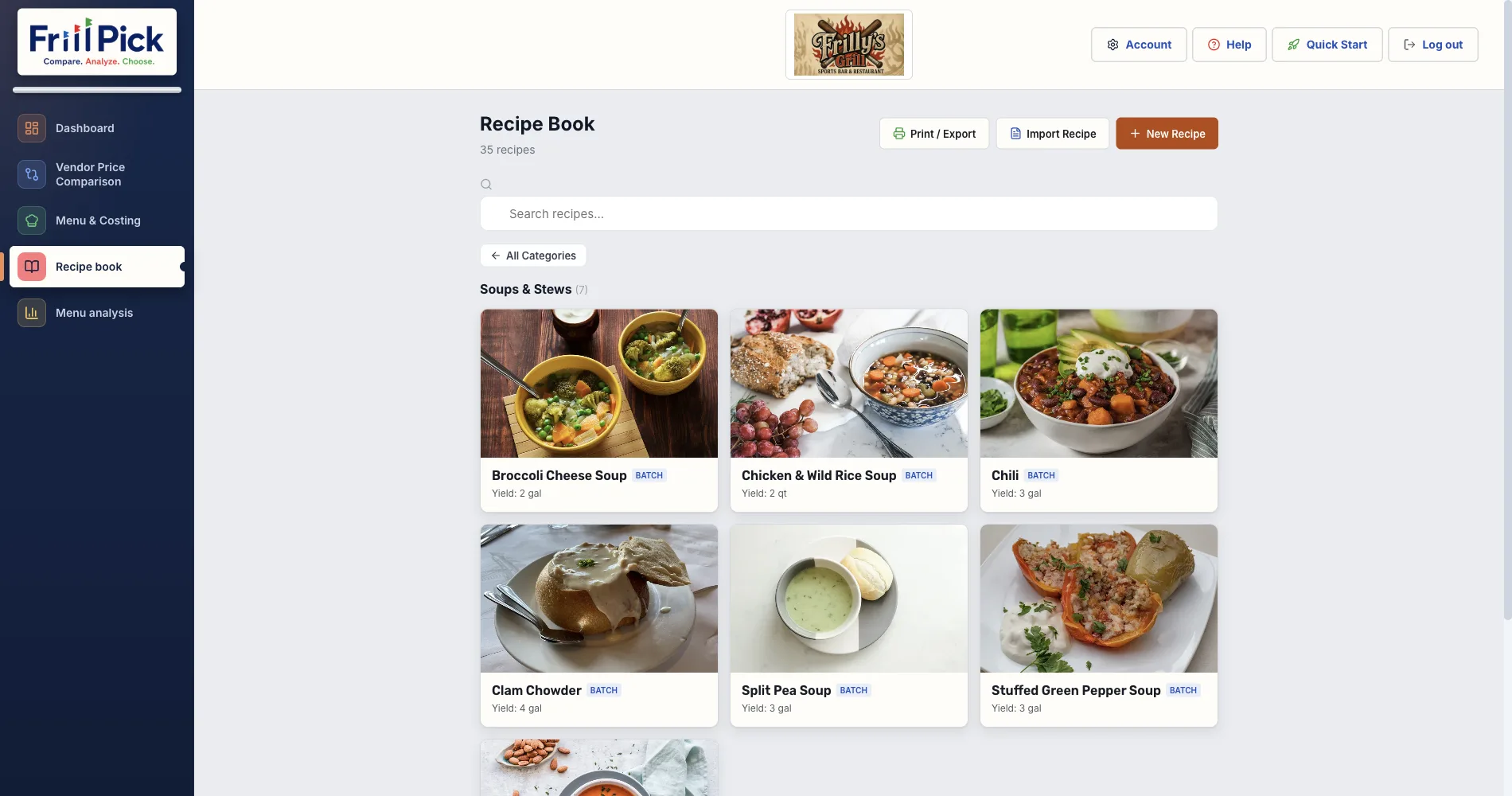
- Recipes by category. Appetizers, entrees, sides, soups, sauces, prep items and more, each shown as a card with the dish photo.
- Search. Find any recipe by name.
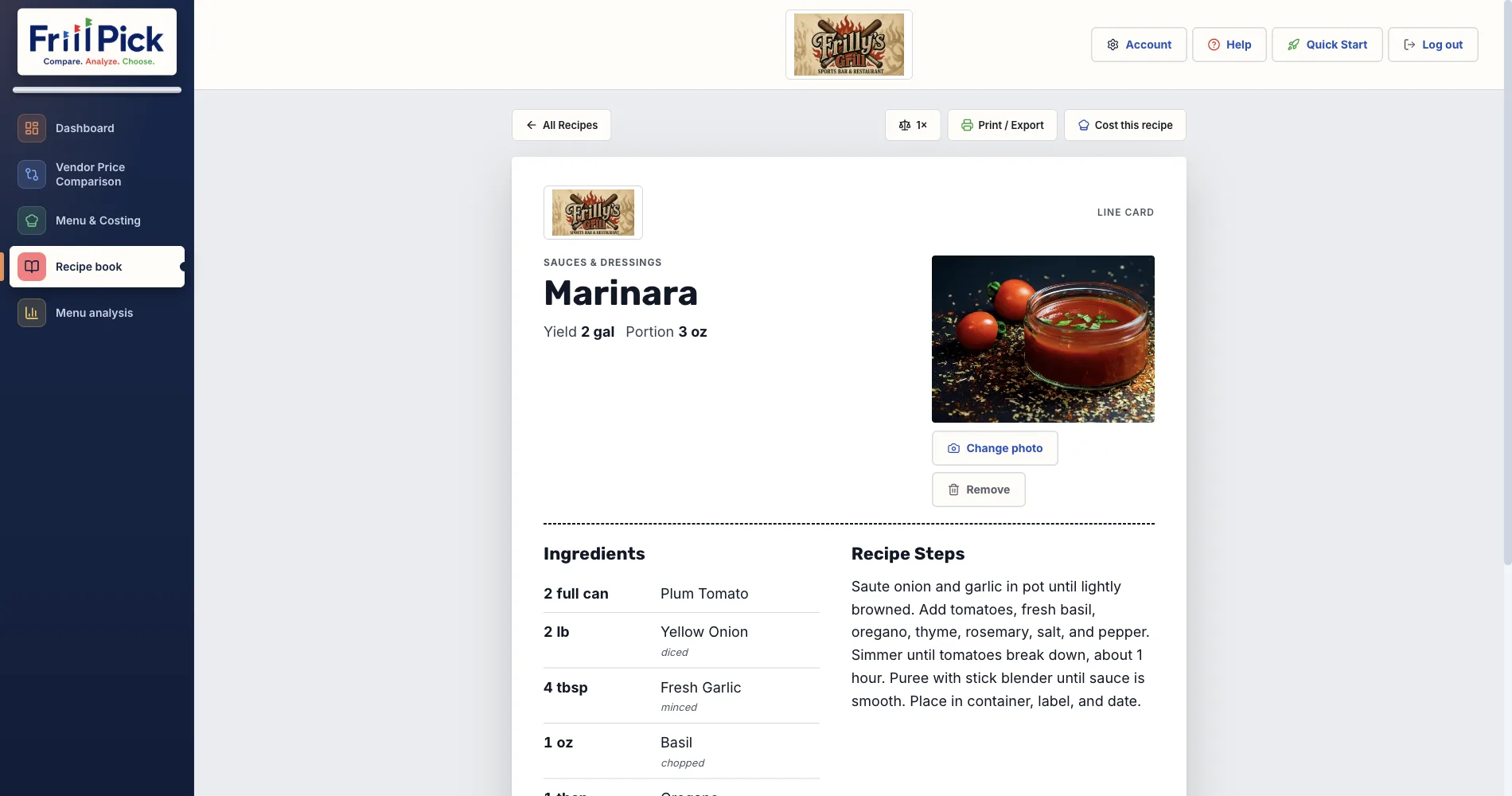
- A line card for every recipe. The photo, the ingredients with their amounts, and the steps, laid out the way a cook reads them.
- Photos. Add, change or remove a dish photo, so a new plating replaces the old one.
- Scaling. Show a recipe at a quarter, half, double or triple of the original batch.
Print and Share With the Kitchen
Print or export one recipe, a whole category or every recipe at once, as one per page or running together. Choose the version that fits who's reading it:
- Kitchen: ingredients, amounts and steps, with no prices on the page.
- Cost: the same recipe with pricing, food cost % and margin, for you.
Send it to the printer, save it as a PDF, or export it to Word or a plain text file.
Every Recipe Has a Real Cost
Recipes in the Book are the same recipes you cost in Menu & Costing, so a "Cost this recipe" button on each one opens its numbers. Costs come from the price sheets you upload from your vendors, and every recipe using an item updates when a new sheet arrives. Sauces and other prep are costed once and used as ingredients anywhere.
The Recipe Book screen itself leaves costs off, so it reads cleanly in the kitchen. See how FrillPick works out each cost on the recipe costing software page.
Getting Your Recipes In
Add a recipe from the Recipe Book with New Recipe, or use Import Recipe to bring one in from a photo, PDF, Word file or pasted text. FrillPick shows you what it read so you can check it before saving.
FrillPick is one $20 plan that keeps your recipes, their costs from your vendors' price sheets, and side-by-side vendor prices together, with no setup and no per-location charge for locations that share a menu. Weighing other recipe tools like meez? See how recipe costing software compares on published price and features.
What It Doesn't Do
- No nutrition or allergen labels.
- No separate staff logins yet. Print the Kitchen version for your team.
- No inventory counts or POS connection.
Put Your Recipes in One Place
Add or import your recipes, attach real costs from your vendors' price sheets, and print line cards your kitchen can follow.
Start Free Trial14-day free trial, then $20/month · Works with any distributor CSV or Excel file
Frequently Asked Questions
Is FrillPick a recipe app for home cooks?
No. FrillPick is built for restaurant kitchens: it costs every recipe from the price sheets you download from your food distributors, and prints recipe cards your line can follow.
Can I print recipe cards for my kitchen without prices on them?
Yes. Print or export one recipe, a category or every recipe in the Kitchen version, which leaves costs off. The Cost version adds pricing, food cost % and margin.
Can I scale a recipe up or down?
Yes. The Recipe Book scales a recipe's ingredient amounts to a quarter, half, double or triple of the original batch.
How do I get my recipes into FrillPick?
Type them in, or import one from a photo, PDF, Word file or pasted text and check what FrillPick read before saving.
Does FrillPick do nutrition or allergen labels?
No. FrillPick doesn't calculate nutrition or tag allergens.
How much does FrillPick cost?
$20 a month after a 14-day free trial. One plan includes the Recipe Book, recipe costing, vendor price comparison and menu analysis.
About the author: Chris is an independent restaurant owner and the founder of FrillPick, a price comparison, menu costing and recipe tool built for fellow operators.